Disabling Xiaomi Mi 8 LED
android
A walkthrough of desactivating the notification / battery LED for the Xiaomi Mi 8 Lite.
If you came here just for the solution go to the Solution section.
Backstory
During this summer I installed a custom ROM to my phone and rooted it. This was partially for tinkering and partially because I wanted to see the “new” Android 15 UI. The phone that I have, is the first phone that I ever bought: a Xiaomi Mi 8 Lite. When I bought it, 6 years ago, I didn’t think very long term, and I just wanted something cheap so I could convince my parents to buy me a phone. Also, naive me, I didn’t care nor know the full extent of the bloat of Mi devices. The rooting process could’ve been a blog entry of it’s own, but I’ll narrate that odyssey another day. I went for an unofficial PixelOS ROM that came with Android 15. I would’ve preferred LineageOS, but there wasn’t any builds for Android 15. Shortly after installation I patched the ROM with Magisk and I gained root access. Root meant I had power, and I was going to take any opportunity to use it.
The problem
Over time, when I used my phone I noticed that the LED light would start blinking (or “breathing”) when the battery was low. At first it wasn’t annoying but over time, it became almost infuriating. Specially since I didn’t know what was happening as sometimes I didn’t have low battery and it kept flashing. The notification light also works to indicate if the phone is charging and other features, but that didn’t disturb me at all.
Trying to find a solution blindly (and almost stumbling into it)
My very first idea was to use my newly gained root powers to fix this, so I did some research. It turns out that Android keeps the configuration of the leds at /sys/class/leds. After a lot of manual trial and error of setting values in the files using Termux I gave up, as I couldn’t find which LED was responsible for the behaviour. Now, below are the directories inside /sys/class/leds, which of these ones do you think that is the one that controls the front white LED?
blue/           led:switch_0/  mmc1::/
green/          led:switch_1/  red/
lcd-backlight/  led:torch_0/   torch-light0/
led:flash_0/    led:torch_1/   torch-light0_1/
led:flash_1/    led:torch_2/   torch-light1/
led:flash_2/    mmc0::/        wled/
You’d probably guess wled, but when you would do echo 0 > wled/brightness, you would just be staring at an idiot who turned his screen black.
In each of these folders there are a myriad of other subfolders, symlinks and distractions like triggers that are identical for all of them and that provide no meaningful differentiation between them. So, it wasn’t unsurprising that without following any methological approach, I couldn’t find anything.
Converging Diversions
This wasn’t something that I had dedicated much time, but it was still something unresolved and I wanted to do something about it. It also didn’t help that there was 0 information about it online so there wasn’t much that I could do. In fact, the few information that I found were just red herrings. Even though unrelated, what I learned when trying to advance from there became useful for finding the answer.
The sources online said that notification_policy.xml contained all of the notification triggers for all of the apps so I should be able to find it here. This was were I found out that actually what was called .xml wasn’t really XML but actually ABX a compressed and more efficient version of XML that Android introduced as a replacement for the former in Android 12.
I was for some reason convinced that my phone couldn’t decrypt that on it’s own and that I needed to do it on my laptop, so after trying out some very poorly documented repos I realized that I had to download an NDK (Native Development Kit). This led me to download Android studio after not being able to download the NDKs from my distro’s repositories.
As I was trying to configure my phone for wireless debugging (for some reason) I stumbled upon an interesting section of the “System” android settings: “Device Specific Settings” with the icon of Mi next to it. Upong cliking it, I saw:
Notification LED
And below it an option that read: “LED Brighness” above a slider. It was perfect! I could just set it to 0 and it would work!
Nope. The minimum value was 1% and it seemed like the LED didn’t care about it when it was blinking/breathing. So, what to do? Well, of course, finding the package that contained this configuration, decompiling it and trying to read through it’s code any call referencing that slider…
Funnily enough I already had everything that I needed, Android Studio. Googling led me to find out that the package was called org.Lineageos.settings.device. What does LineageOS have to do about this? I don’t know, I was too excited to finally figure out what triggered it. After pulling the APK and opening it in Android studio I found the file responsible for it scouring through the directory tree.
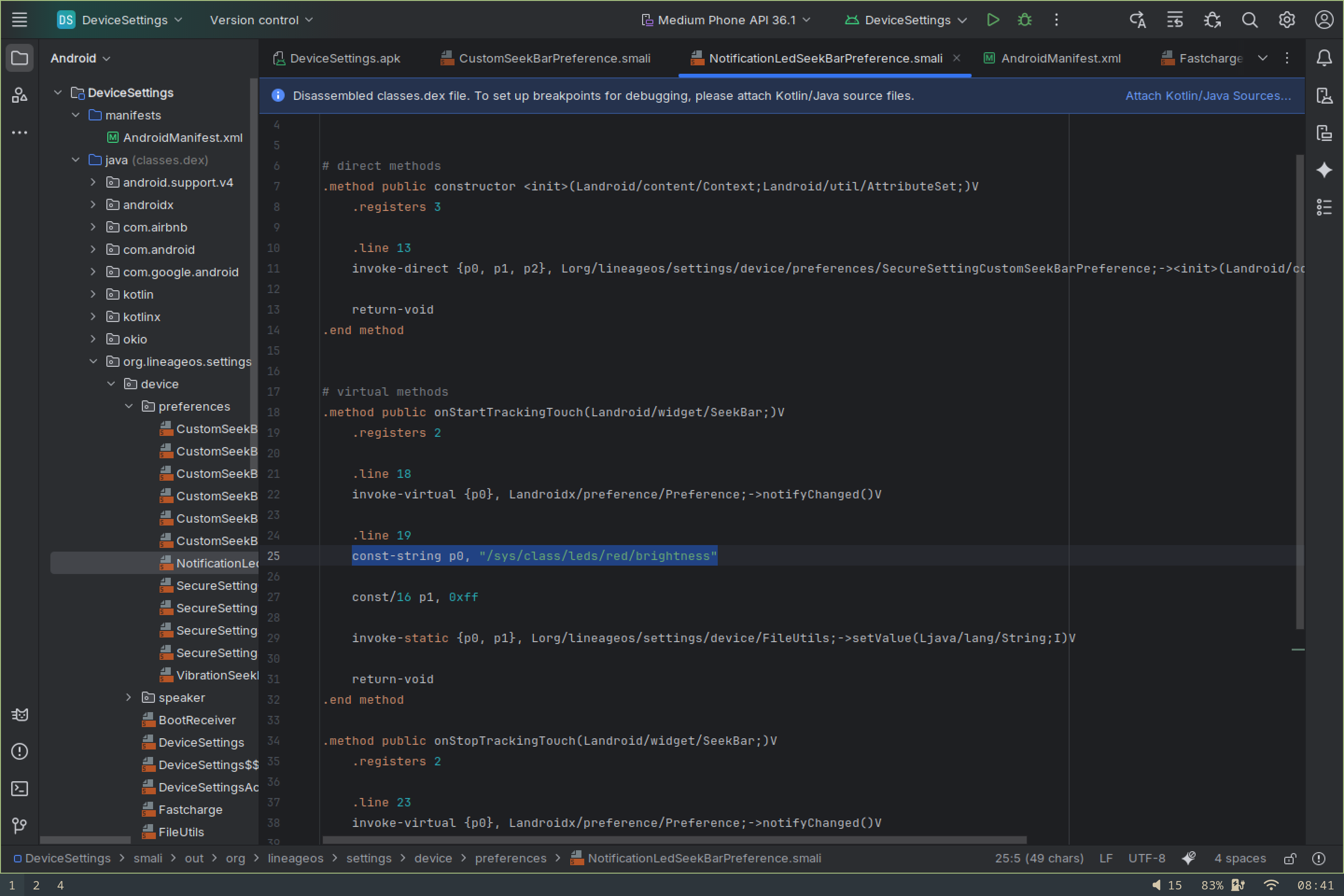
As can be seen from the line:
const string p0, "sys/class/leds/red/brightness"
It turned out that the notification dot was able to be modified all along from the /sys/class/leds, the only thing is that for some reason, the only LED that I didn’t touch was the red one. I checked the green one, the white one, even the Torch!! Who would’ve guessed that the while led on top of my screen was controlled by the red led…
Solutions
It turns out that this light only activates if the battery is below the Schedule (based on percentage) set by the Battery Saving settings. You can turn it all the way up to 75% and no matter if you have battery saver set or not, the light will breathe it’s photons at your face. Disabling the schedule will just trigger it at 20%, so what I’ve found to be the best option is to enable the schedule from the settings and set it to 0% with the following command:
settings put global low_power_trigger_level 0
If you alternatively just want to reduce the brightness of the LED when it’s in it’s solid state go to: (Android) Settings > System > Device Specific Settings > Notification LED and change the percentage. Note that this will just change the brightness of the solid light and not the breath behaviour.
If you’re interested about turning off the LED entirely you have either temporal or permanent solutions, both of which require you to be rooted.
To disable the LED temporarily you just need to set /sys/class/leds/red/breath to 0. You can do so with the following command:
echo 0 > /sys/class/leds/red/breath
If you want to reduce the solid LED brightness to 0 or to whatever value you want change the value of /sys/class/leds/red/brightness and /maxbrightness to you custom value. For example, zero as seen the following examples:
echo 0 > /sys/class/leds/red/brightness
echo 0 > /sys/class/leds/red/max_brightness
Note that this will not affect the breathing of the LED permanently, but it will turn it off until it gets activated again.
I’m still searching for ways to disable it permanently, and once I do, I’ll update this post.
Anyways, that’s all of it for now. I hope that you found it useful in some way.